Why I Stopped Opening 5 IDE Windows: Building a Supercharged Polyglot Workspace in VS Code
For most of my career, I was writing C# or Python - often simultaneously. Like many developers starting out, I followed the herd and installed heavy, specialized IDEs: Visual Studio (loaded with ReSharper) and PyCharm. They are fantastic tools out of the box, with full-blown features toggled "On" by default. Back then, setting up async flow debugging in a couple of clicks felt like magic.
My workstations usually had enough RAM to tank the overhead, so I didn't care. I learned to manage DB connections, Git branches, and codebases entirely inside those heavy ecosystems. It was hard to imagine working without them (and actually - was all-in-all unimaginable).
Then I joined a company actively breaking down a massive monolith into microservices. The codebase was still sprawling.
One morning, PyCharm decided to re-index the repository in the background. I couldn't see the background process, but I could definitely hear it. My laptop fan sounded like a jet preparing for takeoff.
Your CPU shouldn't exist just to index files.
Reinstalling didn't fix it, so didn't service folders exclusion. Navigating back and forth between two resource-hungry IDEs was killing my context switching. And moving strictly to Visual Studio wasn't viable on Linux.
So I took a step back to re-evaluate my setup.
Moving to an "Opt-In" IDE
I had used Sublime Text for years, but it occupied a specific niche in my workflow: single-file edits, scratchpads, and fast text manipulation. I really wanted to make it work at first, but it turned into too much trade-offs, even on an early stage.
That led me to VS Code. My initial suspicion was that it would just be Sublime with a larger plugin ecosystem. Instead, I realized its true strength: it is an Enterprise-level IDE with every single feature toggled "OFF" by default.
I opened the microservices repo, configured remote debugging, added a visual Git plugin, and offloaded database operations to DBeaver (a dedicated database client that outperforms built-in IDE extensions anyway). Everything ran smoothly in a single tool.
There was still one major operational friction point: managing a multi-service ecosystem day-to-day.
The Polyglot Workspace Problem
If you're working on 2 to 10 microservices simultaneously, opening a separate editor instance for each service is inefficient.
Suppose you have a project directory structured like this:
/headsntails
    ├── /headsntails-core       (Go)
    ├── /headsntails-platform   (Orchestration + Nginx)
    ├── /jwt-authority          (Python / FastAPI)
    ├── /rate-limiter           (Python / FastAPI)
    └── ecosystem.code-workspace
If you simply click File → Open Folder on /headsntails, VS Code treats it like one giant, flat monorepo:
* Config Pollution: It expects a single root .vscode/launch.json.
* Folder Noise: Every single file and nested folder gets pulled into your file tree indiscriminately.
* Language Server Wars: gopls (Go) and Pyright (Python) try to index the entire parent directory, tripping over each other's binaries and virtual environments - bringing back the high CPU usage you tried to avoid.
The Solution: .code-workspace
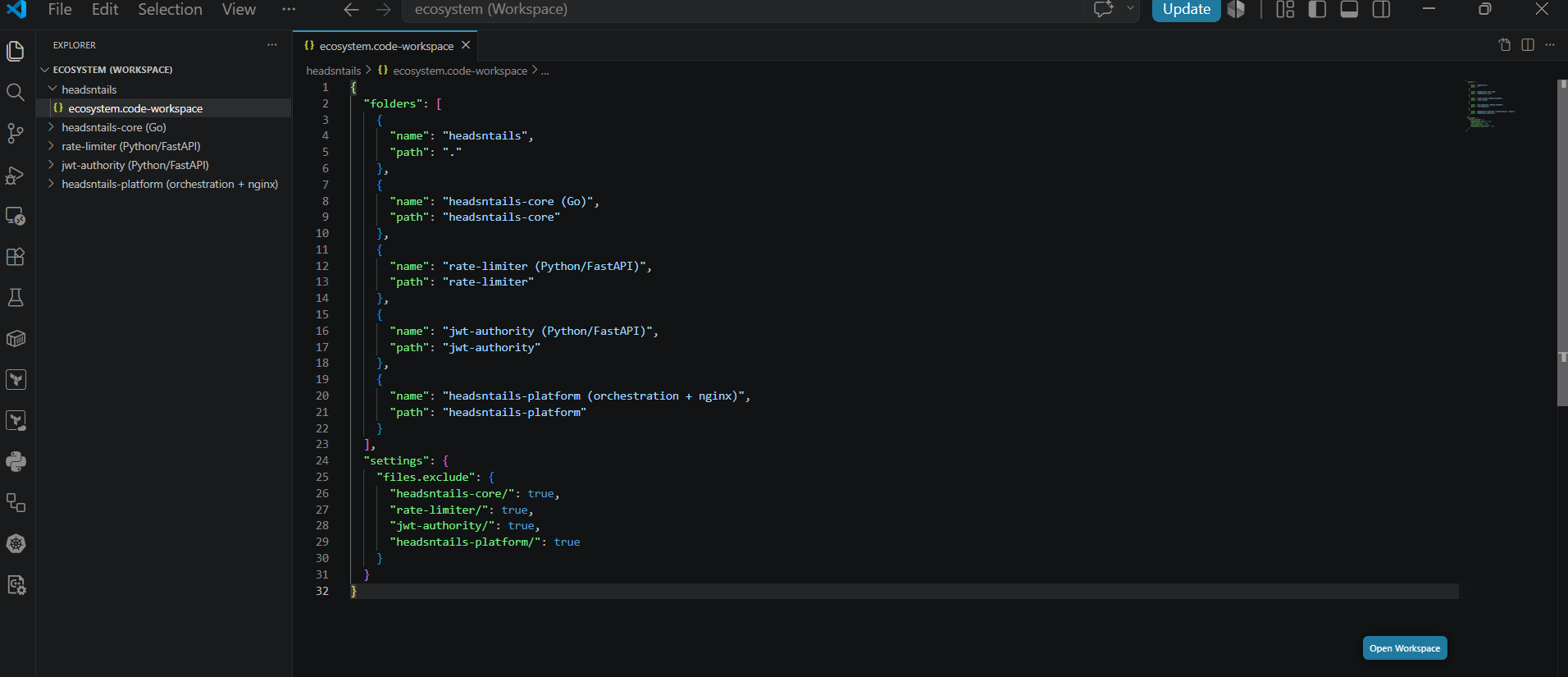
Instead of opening a parent directory, you can define a .code-workspace JSON file. This treats each subfolder as an independent, first-class project within a single editor window.
1. The Barebones Setup
This basic configuration gets multi-root folder management working immediately:
{
  "folders": [
    {
      "name": "headsntails (Root Configs)",
      "path": "."
    },
    {
      "name": "headsntails-core (Go)",
      "path": "headsntails-core"
    },
    {
      "name": "rate-limiter (Python/FastAPI)",
      "path": "rate-limiter"
    },
    {
      "name": "jwt-authority (Python/FastAPI)",
      "path": "jwt-authority"
    },
    {
      "name": "headsntails-platform (Nginx/Infra)",
      "path": "headsntails-platform"
    }
  ],
  "settings": {
    "files.exclude": {
      "headsntails-core/": true,
      "rate-limiter/": true,
      "jwt-authority/": true,
      "headsntails-platform/": true
    }
  }
}
- Explorer Isolation: Notice the
files.excludeblock. It hides child directories under the root view so you don't see duplicate folder trees.
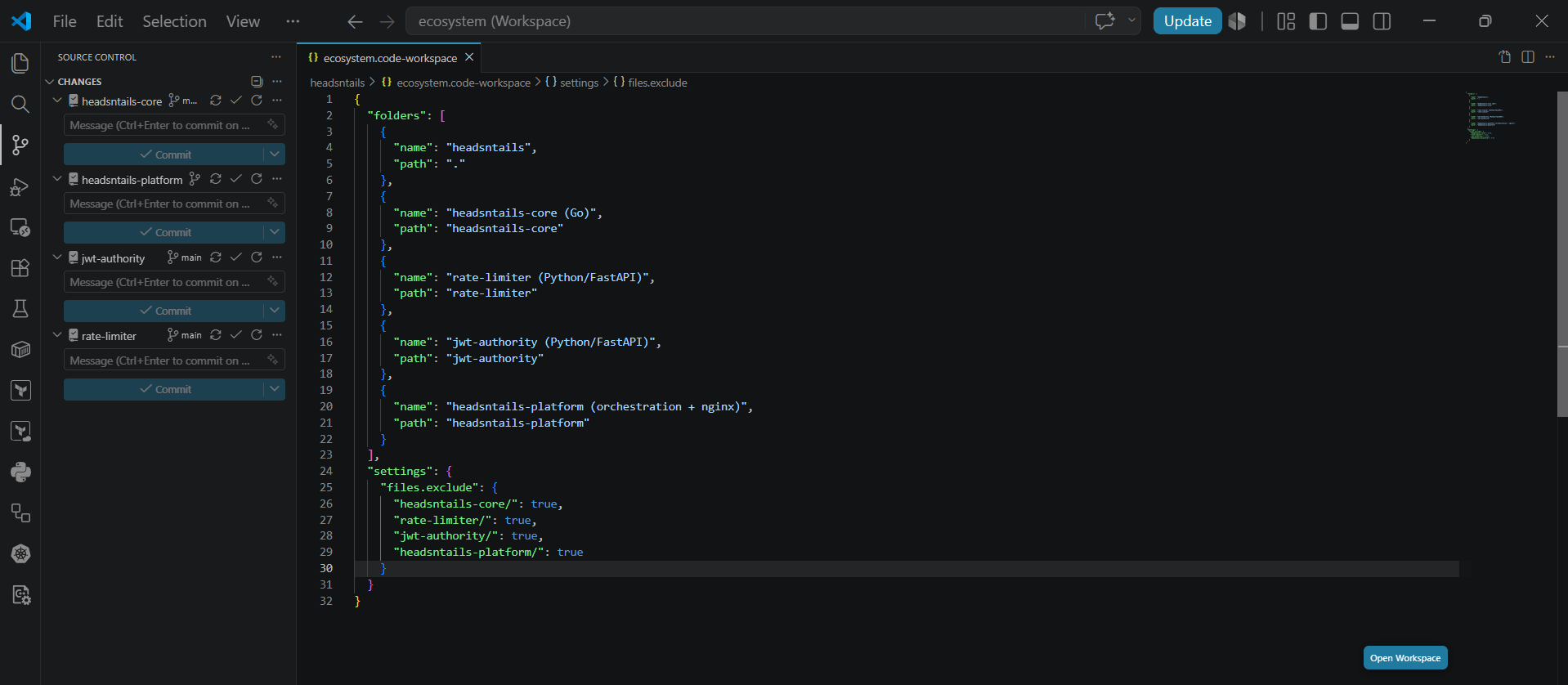
- Git Root Awareness: VS Code's Source Control tab automatically detects each service as an independent Git repository, allowing you to stage and commit branches per service without opening multiple windows.
2. The Supercharged "Production-Grade" Setup
While the barebones configuration cleans up your UI, a fully realized workspace file acts as a version-controlled local dev environment for your team.
Here is what a production-ready configuration looks like:
{
  "folders": [
    {
      "name": "headsntails (Root Configs)",
      "path": "."
    },
    {
      "name": "headsntails-core (Go)",
      "path": "headsntails-core"
    },
    {
      "name": "rate-limiter (Python/FastAPI)",
      "path": "rate-limiter"
    },
    {
      "name": "jwt-authority (Python/FastAPI)",
      "path": "jwt-authority"
    },
    {
      "name": "headsntails-platform (Nginx/Infra)",
      "path": "headsntails-platform"
    }
  ],

  "settings": {
    /* -----------------------------------------------------------------
     * 1. Explorer & Search Boundary Isolation
     * ----------------------------------------------------------------- */
    "files.exclude": {
      "headsntails-core/": true,
      "rate-limiter/": true,
      "jwt-authority/": true,
      "headsntails-platform/": true,
      "**/.git": true,
      "**/.DS_Store": true
    },
    // Excludes build artifacts & dependencies from global search (Ctrl+Shift+F)
    "search.exclude": {
      "**/node_modules": true,
      "**/vendor": true,
      "**/.venv": true,
      "**/__pycache__": true,
      "**/dist": true,
      "**/coverage": true
    },

    /* -----------------------------------------------------------------
     * 2. Polyglot Language Server & Formatting Isolation
     * ----------------------------------------------------------------- */
    // Python Rules (scoped to Python tools)
    "[python]": {
      "editor.defaultFormatter": "ms-python.python",
      "editor.formatOnSave": true,
      "editor.codeActionsOnSave": {
        "source.organizeImports": "always"
      }
    },
    "python.analysis.extraPaths": [
      "./rate-limiter",
      "./jwt-authority"
    ],

    // Go Rules (scoped to gopls)
    "[go]": {
      "editor.defaultFormatter": "golang.go",
      "editor.formatOnSave": true
    },
    "gopls": {
      "ui.completion.usePlaceholders": true,
      "ui.diagnostic.staticcheck": true
    },

    /* -----------------------------------------------------------------
     * 3. Integrated Terminal & Environment Injection
     * ----------------------------------------------------------------- */
    "terminal.integrated.env.linux": {
      "ENV": "local",
      "LOG_LEVEL": "debug",
      "PYTHONPATH": "${workspaceFolder}/rate-limiter:${workspaceFolder}/jwt-authority"
    }
  },

  /* -------------------------------------------------------------------
   * 4. Team & System Recommended Extensions
   * ------------------------------------------------------------------- */
  "extensions": {
    "recommendations": [
      "golang.go",
      "ms-python.python",
      "ms-azuretools.vscode-docker",
      "eamodio.gitlens",
      "humao.rest-client"
    ]
  }
}
Why This Approach Wins
- Deterministic Team Onboarding: When a new engineer joins the team, they don't need to read a 10-page wiki to configure linters or extension setups. Checking out the repo and opening
ecosystem.code-workspaceconfigures their environment instantly. - Global Search Precision: Setting
search.excludekeeps build artifacts (.venv,vendor,__pycache__) out of globalCtrl+Shift+Fqueries. Search results remain fast and relevant. - Zero Extension Bloat: Language server configurations stay scoped strictly to the projects that need them. Go tools won't attempt to index Python virtual environments, and Python extensions won't interfere with Go source trees.
A clean, predictable workspace is always worth the upfront setup. Tooling should support your development speed - not hijack your CPU cycles.